The editing interface in Google Photos now supports a light-theme editing interface on Android.
The editor’s theme follows your device settings.
We saw this change in development last year, but it seems to be rolling out broadly this week.
Back in November, we spotted that Google was cooking up a new light theme for the image editor in Google Photos. At the time, enabling this look took some tinkering — but now, the new light theme is rolling out publicly in multiple versions of the Photos Android app.
The editing view for Google Photos has historically featured a dark gray background. That’s easier on the eyes when using your phone in a dark room, but it might not always be what you want. After an apparent server-side update that’s hitting users this week, that background will match your device theme: dark gray on dark mode, light gray for light mode.
Welcome to our latest roundup of what's going on in the indie game space. It’s been a very busy week of fun game releases (next week will be too!), so let’s get into some of them after a quick reflection on gaming while traveling.
I love my Steam Deck. I really truly do. It’s a fantastic machine. And yet when I brought it with me on a five-week trip over the holidays, I used it for barely an hour the entire time. That doesn’t really justify the space and weight it takes up in my bag. The same holds true for my Nintendo Switch 2 and PlayStation Portal.
I’ll be leaving them all at home next time. I’ll take a small controller (probably OhSnap's MCON) so I can play the odd game on my laptop or phone. I’ll bring my Playdate as well. I adore that little yellow console, and I haven’t spent nearly enough time using it. I have a lot of neat-looking indie games to catch up on there (Diora looks particularly interesting). I’m more likely to play something on a flight if it’s on a device I can pull out from my pocket. I just wish Panic had put a backlight in the Playdate.
New releases
Massive Monster and publisher Devolver Digital gave Cult of the Lambfans a whole bunch of reasons to jump back into the game this week with the arrival of the Woolhaven expansion. You'll need to get close to the end of the base game (though you don't need to beat the final boss) before you can experience what the DLC has to offer. It includes weather effects, a new mountain area with a pair of fresh dungeons, a ranching system (which allows you to raise animals as pets or for food) and much more.
Folks who dig Cult of the Lamb seem to get really into the game. After a few years of free updates from Massive Monster, Woolhaven is a major expansion that's similar in scope to the base game, so it should keep fans busy for quite a while if they want to try everything. The DLC is out now on PC, Nintendo Switch, PS4, PS5, Xbox Series X/S and Xbox One. It costs $17 if you already have the base game.
Inkle, the studio behind Overboard! and the wonderful A Highland Song is back with TR-49, a puzzle game with a World War II computer at its core. Over five decades, an array of books, letters and journals were fed into the machine as part of an effort to "crack the code of reality." But now you're tasked with finding and destroying one specific book before a timer runs out.
It all seems rather mysterious. To give you a sense of what's going on here, Inkle says it drew inspiration from narrative deduction games like The Roottrees are Dead, The Return of the Obra Dinn and Her Story, as well as audio dramas. I can't see myself having the time or patience to figure out the enigma of this particular machine (I imagine many players will need a notebook for this one), but I'm intrigued enough to at least watch a Let's Play at some point. You can experience this mystery for yourself on Steam (normally $7, but there's a 10 percent launch discount until January 28).
Another week, another Metroidvania, but MIO: Memories in Orbit has a more striking art style than most. This game from Douze Dixièmes and publisher Focus Entertainment debuted to positive reviews this week. After the AI caretakers on a forgotten spaceship stop working, you'll have to help the robot MIO explore the spacecraft "to revive its lost memories" and save it from doom. Naturally, you'll discover some new abilities along the way, including a grappling hook and air gliding.
MIO: Memories in Orbit is available on PS5, Xbox Series X/S, Nintendo Switch, Switch 2, Steam, the Epic Games Store and the Microsoft Store for $20 (with a 10 percent launch discount on some platforms). You can also check it out via Game Pass Ultimate and PC Game Pass.
Perfect Tides: Station to Station is a pixel-art point-and-click narrative adventure and a sequel to Three Bees' Perfect Tides. Over the course of an in-game year, you'll help 18-year-old Mara explore the big city and find her place in the world.
The early 2000s vibes of the trailer are immaculate, so I'm going to have to try to play this at some point. Perfect Tides: Station to Station is out now on Steam for PC and Mac for $20.
Cozy cafe sim Tailside debuted in early access on Steam (normally $11, but there's a 10 percent discount until January 28) this week. I'm bummed I haven't had a chance to try this one from Coffee Beans Dev yet, because it looks lovely.
Along with serving snacks and drinks to your furry customers, you can learn more about the visitors to your cafe by reading stories about them in the newspaper (hopefully nice ones!). You can play at your own pace as you draw latte art and decorate your cafe. Eventually, you'll be able to visit other players' cafes and open a flower shop. Like I said, it looks lovely.
Upcoming
BALL x PIT’s first FREE major update, The Regal Update, launches on January 26th on all platforms!
Adding: 🤠2 new characters - The Carouser & The Falconer 🏐8 new balls 🎯New passives ✨Plus a nice surprise you’re going to love! pic.twitter.com/t0tYlwjOXk
One of my favorite games of last year is getting a free update on January 26. Just when I thought I was out of Ball x Pit, Kenny Sun and friends (along with publisher Devolver) are pulling me right back in to check out two new characters, eight fresh balls with their own abilities, more passives and some kind of surprise.
I adore Ball x Pitand this update is going to be a drop everything and play immediately deal for me. The Regal Update will be available on all platforms: Steam, PS5, Xbox Series X/S, Nintendo Switch and Switch 2. Ball x Pit costs $15. It's available via Game Pass Ultimate and PC Game Pass too.
I'm interested to check out the demo for Vampire Crawlers, a Vampire Survivors spin-off. Poncle will release it on February 23 at Steam Next Fest as well as on Xbox. Your progress will carry over into the full game, which will be on Game Pass on day one.
As a rule, turn-based games aren't really my jam, and nor are roguelike deckbuilders. But I'm a big fan of Vampire Survivors, so I'm definitely willing to give this a shot. It helps that Vampire Crawlers seems to be fast-paced and that it draws from the chaotic visuals of the original game. Vampire Crawlers is coming to Steam, Xbox Series X/S, PS5, Nintendo Switch, iOS and Android later this year.
Speaking of interesting demos, one for Ratcheteer DX is available now on PC ahead of the full game's release on Switch, Steam (PC and Mac) and the Mac App Store on March 5. It'll normally cost $13, but a limited-time discount will reduce the price to $9.75. If the game's name sounds familiar, that's because this is a color version of the Playdate season one title Ratcheteer.
This take on the pixel-art action-adventure has multiple visual filters, a "CD-quality stereo soundtrack" and support for more languages. Playdate creator Panic is publishing Ratcheteer DX, whose developers are Shaun Inman, Matthew Grimm and Charlie Davis.
Let's wrap things up for this week with a cinematic trailer and release date for Aethus, a story-driven survival-crafting and base-building game from a solo developer at Pawsmonaut Games. It's coming to Steam on March 6.
Aethus is a game about "carving out a future from the ruins of corporate greed" in a dystopian sci-fi world. As ex-mining engineer Maeve, you start with basic gear and a drone companion by your side. You'll explore what's left of a failed science expedition and abandoned facilities as you try to establish your own mining claim after leaving a company that drains planets of their resources.
Of course, you'll upgrade your gear and build out your base as you progress. You can modify settings like the base's air supply, how quickly your hunger and thirst needs change and how much you can carry to fine tune the experience.
This article originally appeared on Engadget at https://www.engadget.com/gaming/more-cult-of-the-lamb-a-world-war-ii-computer-mystery-and-other-new-indie-games-worth-checking-out-120000807.html?src=rss
It’s been almost a year since the Galaxy S25 series launched, and one of the features Samsung made a big deal about at the time was Now Brief, which is supposed to provide an AI-powered snapshot of your day by pulling in data from your calendar, the weather, Samsung Health, and more. We’ve been less than impressed with Now Brief, finding that it rarely has anything of use to show you. On a recent work trip to London, I decided to put some effort into making it useful, and to my surprise, I was successful.
Now Brief tries to be a travel companion
Of all of the things Now Brief is supposed to be able to do, I wanted it to show me ETAs for upcoming events. The idea is simple — Now Brief looks at calendar events with a tagged location, checks where you are, and then works out when you should leave to get there on time. If that sounds familiar to you, that’s probably because that’s one of the many useful things that Google Now did back in the day.
More ads are coming to App Store search results starting in March, Apple shared on an advertising help page. The company first said that it would increase the number of App Store ads last month, and this new rollout of search ads will begin on Tuesday, March 3, according to a developer email viewed by MacRumors.
"Search is the way most people find and download apps on the App Store, with nearly 65 percent of downloads happening directly after a search," Apple says. "To help give advertisers more opportunities to drive downloads from search results, Apple Ads will introduce additional ads across search queries." Up until this point, ads for related apps have appeared at the top of search results, but now they'll also appear "further down in search results," according to Apple.
App Store activity makes up a significant portion of what Apple calls its "services" business. The company makes money on every App Store transaction, whether it's an app download or an in-app purchase, and increasingly, by selling ad space to companies looking to reach users. App Store ads are hardly new, but the number of ads has steadily increased over the years. Apple added ads to the Today tab in 2022 — a space that's already home to editorial curation that doubles as marketing — and in 2025, Bloomberg reported the company planned to bring ads to Apple Maps.
Apple's decision to rebrand its advertising business from Apple Search Ads to Apple Ads in April 2025 was maybe the best indication that the company was interested in expanding the number of places it would help partners try and reach customers. And it makes sense: the company's billions of devices, each pre-installed with default apps, are some of the most valuable real estate it owns.
This article originally appeared on Engadget at https://www.engadget.com/apps/apple-will-begin-showing-more-app-store-ads-starting-in-march-192031226.html?src=rss
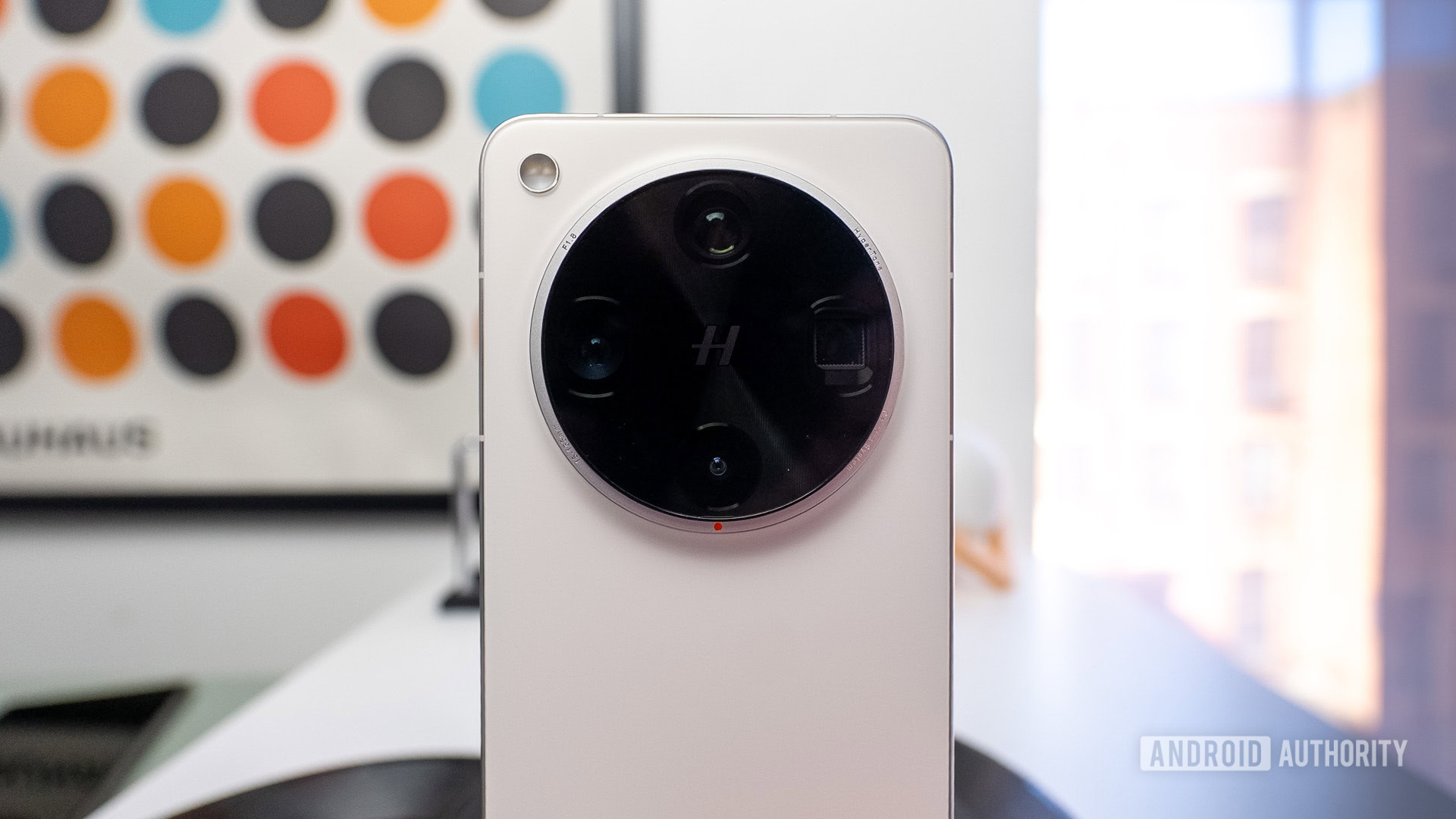
Newly leaked renders show off the upcoming OPPO Find X9 Ultra’s dual-tone design.
The flagship is expected to sport a Snapdragon 8 Elite Gen 5 chip, a massive 7,300mAh battery, and a 6.82-inch 2K flat AMOLED display.
Leaks also point to a 200MP Sony main sensor and a 200MP telephoto lens that reaches 13.2x optical zoom via a 300mm extender accessory.
OPPO’s upcoming Find X9 Ultra flagship was spotted with its insane 300mm telephoto extender accessory earlier this week, but we didn’t get a good look at the phone’s back. A new leak is now sharing Find X9 Ultra renders, along with a detailed list of key specifications.
Don’t want to miss the best from Android Authority?
Basketball fans can save on NBA League Pass right now, which lets you catch a bunch of out-of-market NBA games via streaming. The League Pass Premium subscription is on sale for $75, down from the usual $160, and League Pass Standard is marked down to $50 from $110. Considering we're almost halfway though the season, the discount makes sense and is a good deal for anyone who wants to keep a close eye on the rest of the games to be played this year.
The Standard plan includes commercials and support for only one device at a time, while the Premium tier offers no commercials, in-arena streams during breaks in the game, offline viewing of full games and concurrent streams on up to three devices at once.
Last year, League Pass added multiview, which allows you to view up to four games at once on a single screen. This is included across both subscription tiers. The service also added a smart rewind tool that automatically selects key highlights and plays from each game.
Outside the US and Canada, League Pass carries every single NBA game live, but within these countries a bevy of restrictions apply. In the US, any games being shown on your regional sports network will be blacked out as the service is meant for out-of-market games only. Also, any nationally broadcast games will not be available live, but instead will be available for on-demand viewing at 6AM ET the following day. The service is only for regular-season games.
If you're an avid NBA fan that follows multiple teams then the League Pass almost certainly carries dozens of games you can watch even with the restrictions in the US. Subscribers can get a list of applicable blackouts by entering their ZIP code before signing up.
After being one of the first countries in the world to block Elon Musk’s Grok chatbot, Malaysia has now lifted its ban. Along with Indonesia, the country moved swiftly to temporarily halt access to X's frequently controversial AI chatbot earlier this month, after multiple reports emerged of it being used to generate deepfake sexualized images of people, including women and children.
At the time, the Malaysian Communications and Multimedia Commission (MCMC) said the restrictions would remain in place until X Corp and parent xAI could prove they had enforced the necessary safeguards against misuse of the above nature.
Malaysian authorities appear to be taking X at its word, after the MCMC released a statement confirming it was satisfied that Musk’s company has implemented the required safety measures. It added that the authorities will continue to monitor the social media platform, and that any further user safety breaches or violations of Malaysian laws would be dealt with firmly.
At the time of writing, only Malaysia and Indonesia have hit Grok with official bans, though UK regulator Ofcom opened a formal investigation into X under the country’s Online Safety Act, in the wake of the non-consensual sexual deepfake scandal. X has since changed its image-editing policies, and on January 14 the company said Grok will no longer allow "the editing of images of real people in revealing clothing such as bikinis."
Earlier this week, the UK-based non-profit, the Center for Countering Digital Hate (CCDH), estimated that in the 11-day period between December 29 and January 9, Grok generated approximately 3 million sexualized images, around 23,000 of which were of children.
This article originally appeared on Engadget at https://www.engadget.com/ai/malaysia-lifts-ban-on-grok-after-taking-x-at-its-word-144457468.html?src=rss
Samsung says that consumers can experience the Galaxy Z TriFold from tomorrow.
The device will be on display at select Samsung Experience Stores, mostly located in California, New York, and Texas.
The US launch date is yet to be officially announced.
Whatever your opinion of a triple-panel phone, you might still be curious to check one out for yourself. In the case of the Samsung Galaxy Z TriFold, that doesn’t mean you have to wait for the as-yet-unannounced US release date or spend a small fortune to order one when that date comes. Samsung says the Galaxy Z TriFold will be available to experience in person across the US starting tomorrow, ahead of its official US launch.
The announcement comes via Samsung’s US Newsroom, which says the device will be on display at a limited number of Experience Store locations. It’s not the launch, but it does mark the first time most US customers will be able to get hands-on with Samsung’s most experimental foldable without traveling overseas or attending an industry event.
Ring has launched a new tool that can tell you if a video clip captured by its camera has been altered or not. The company says that every video downloaded from Ring starting in December 2025 going forward will come with a digital security seal. “Think of it like the tamper-evident seal on a medicine bottle,” it explained. Its new tool, called Ring Verify, can tell you if a video has been altered in any way. Even adjusting a video clip’s brightness or trimming a few seconds off will break that seal, and the tool will tell you that it cannot be verified. All you have to do is visit the tool’s web page and upload the video you want to check.
In the era of AI, you can also use the tool to make sure you’re looking at a real Ring video instead of something generated by artificial intelligence models. OpenAI’s Sora, for instance, can easily create Ring video doorbell footage with just a prompt or two, leading to a lot of fake security cam footage on social media apps. The company suggests asking the owner of the camera to share videos straight from the Ring app to make sure they’re unaltered. It also doesn’t matter what camera it is: All of the company’s models now embed digital security seals to downloaded videos and videos shared from Ring’s cloud storage. However, the tool can only tell you if a video has been tampered with or can’t be verified at all. It can’t tell you what has been edited or if it’s AI-generated.
This article originally appeared on Engadget at https://www.engadget.com/home/smart-home/ring-can-now-verify-if-a-video-has-been-altered-140000140.html?src=rss
Spotify’s new Prompted Playlist feature creates custom playlists from text prompts.
The prompts can be as general or specific as you want.
Prompted Playlist debuted in beta in New Zealand last month. It’s now expanding to the US and Canada.
Last month, Spotify introduced a feature it calls Prompted Playlist. Prompted Playlist uses AI to generate custom playlists based on your text input, which can be as broad or specific as you like. The feature has been exclusive to testers in New Zealand, but today, Spotify announced that Prompted Playlist is rolling out in beta in the US and Canada.
As described in a new blog post from Spotify, Prompted Playlist can make just about any playlist you could think up. You can ask for tracks from a specific genre or set of genres, tracks originally released within a specific span of time, tracks that Spotify has tagged as matching a certain mood — if you can describe a playlist, Prompted Playlist can make it.
At their core, refrigerators are relatively simple devices. If you're the type of person to view every extra feature as a component that could potentially go wrong, basic iceboxes are probably the kind you go for. But for those on the other end of the spectrum, Samsung's latest Bespoke Refrigerators with AI inside have more bells and whistles than you might think possible — including an optional 32-inch screen.
Editor's note: The model we tested for this review came out in the second half of 2025 and will continue to be on sale throughout 2026. Hardware will remain the same, the only changes will come in the form of an OTA software update slated for later this year that will add support for Google Gemini, improved food recognition/labeling and more.
Design: As sleek as a fridge can be
If you're into faux vintage appliances like Smeg's retro-inspired models, Samsung's offerings might not be for you. For everyone else, the Bespoke family does minimalist design better than practically any other line of fridges on the market. Granted, the counter-depth French Door AI model I tested is a bit of a departure thanks to a huge 32-inch screen embedded in its right-side door. That said, there are a ton of configurations, including the choice of a smaller 9-inch panel or models without a display at all. The latter looks like a big rectangle, but in a way that Dieter Rams would probably appreciate (I'm just guessing, I don't have his contact info). Other options include setups ranging from four-door models to side-by-side two-door variants or even a single-panel upright model.
Glare is one of the tiny downsides of a fridge with a glass front.
Sam Rutherford for Engadget
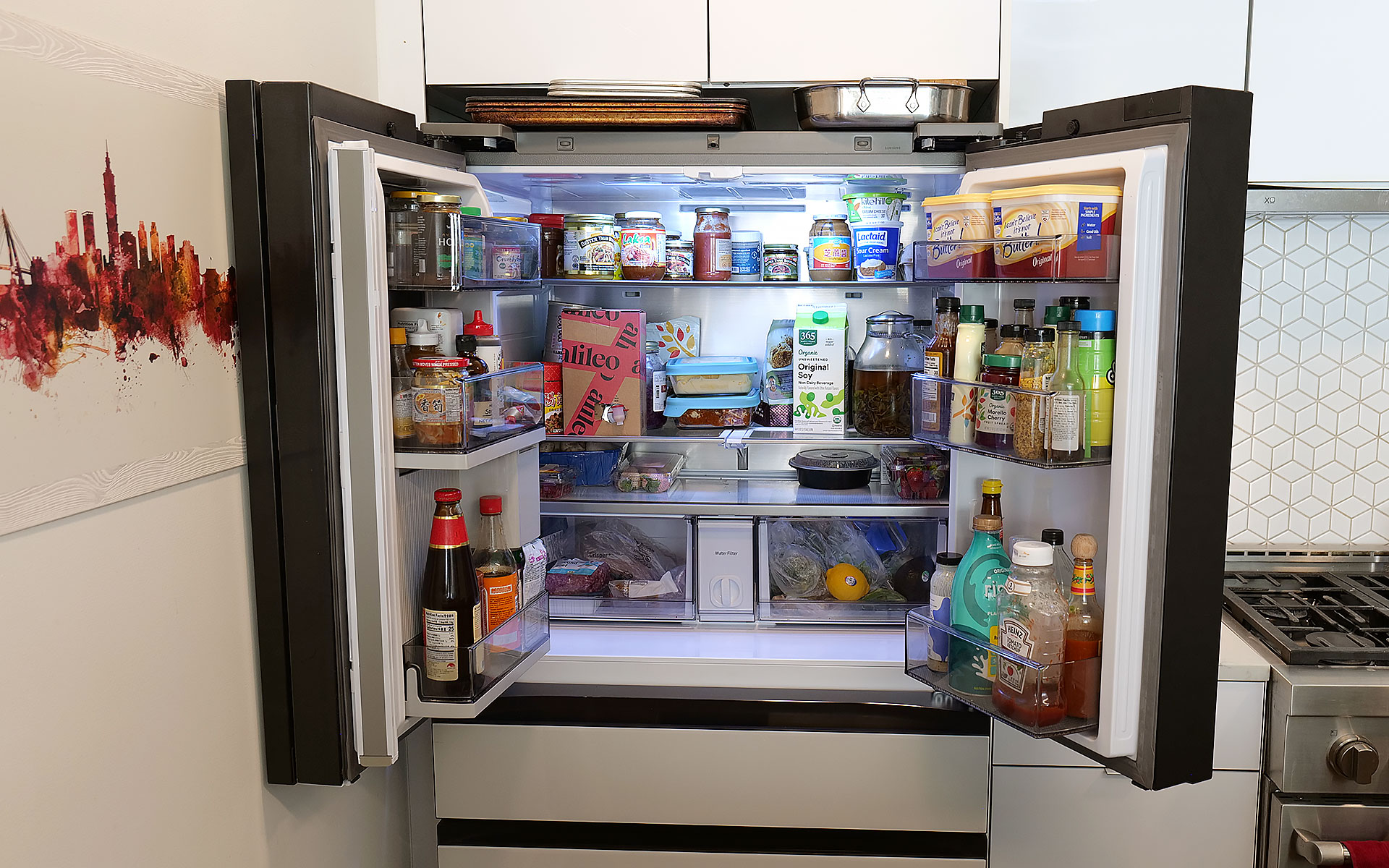
On my review unit, the fresh food section is a touch smaller (16.5 cubic feet) than you might expect from a fridge this size, though I've never really felt limited by the amount of available storage. Samsung does a good job of optimizing interior space by providing a number of adjustable shelves, including a sliding one on the right side that makes it easy to store taller items without completely sacrificing flat space for others. The shelves are also spill proof and made out of tempered glass, so they resist scratches and just look a bit nicer than those made from lower-quality materials. I also appreciate how Samsung found a spot between the two crisper drawers for the water filter, instead of just sticking it in the top corner like a lot of competitors.
Even with the FlexZone drawer stealing some space, the main section of this Bespoke model still features 16.5 cubic feet of storage.
Sam Rutherford for Engadget
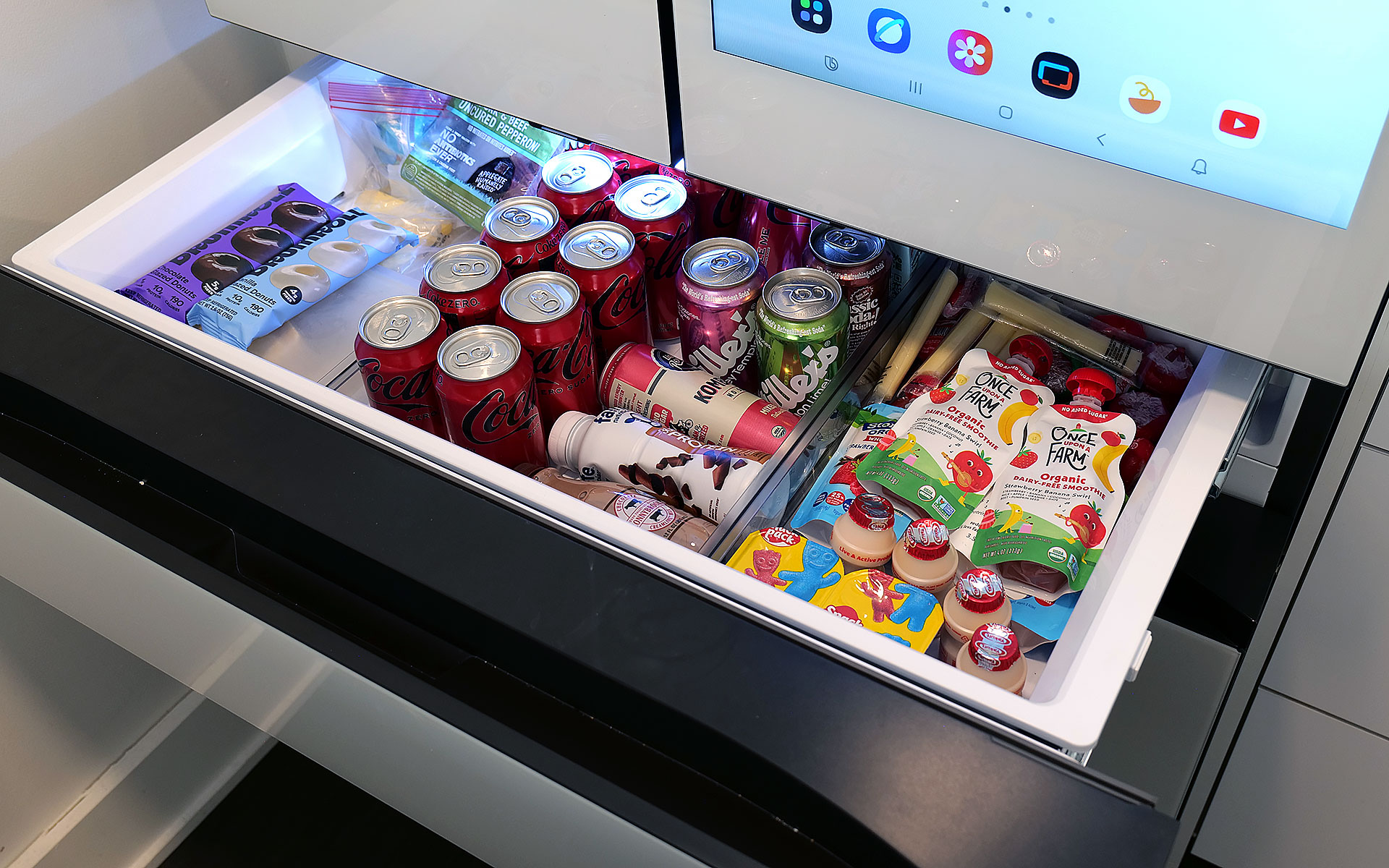
Meanwhile, in exchange for a slightly smaller main cabinet, this model has what Samsung calls a FlexZone drawer, which might be my second favorite thing about this fridge. It's perfectly designed for storing things like 12-ounce cans and juice boxes, and as someone who always likes to keep a couple of chilled Coke Zeros on standby, it's super convenient. That said, taller bottled drinks may need to be stored on their sides, which doesn't feel quite as efficient. But really, you can put anything you want in there and if you have young children like me, it's an excellent place to keep refrigerated kids' snacks. My four-year-old can go in there on his own without needing help from an adult to reach stuff higher up. Samsung even gives you the ability to set a different temperature for the FlexDrawer, which is a nice touch.
The optional FlexZone drawer is amazing for stashing drinks or having a refrigerated section that's easy for kids to reach.
Sam Rutherford for Engadget
Additionally, along with some rivals from LG, this fridge also has touch sensors at the bottom of each door that let you open them with a light tap. While I still prefer to just grab the built-in handles (which are located both above and below each door), this is a nice inclusion, particularly on a fridge that doesn't have giant handgrips bolted to the outside. My one small gripe with Samsung's exterior design is that its top isn't completely flat as it dips down in back. Admittedly, this hasn't stopped me from storing stuff like sheet pans and roasting trays above the fridge, but it would be nicer if things were fully level up there.
Water and ice dispensing: Samsung's Beverage Center reigns supreme
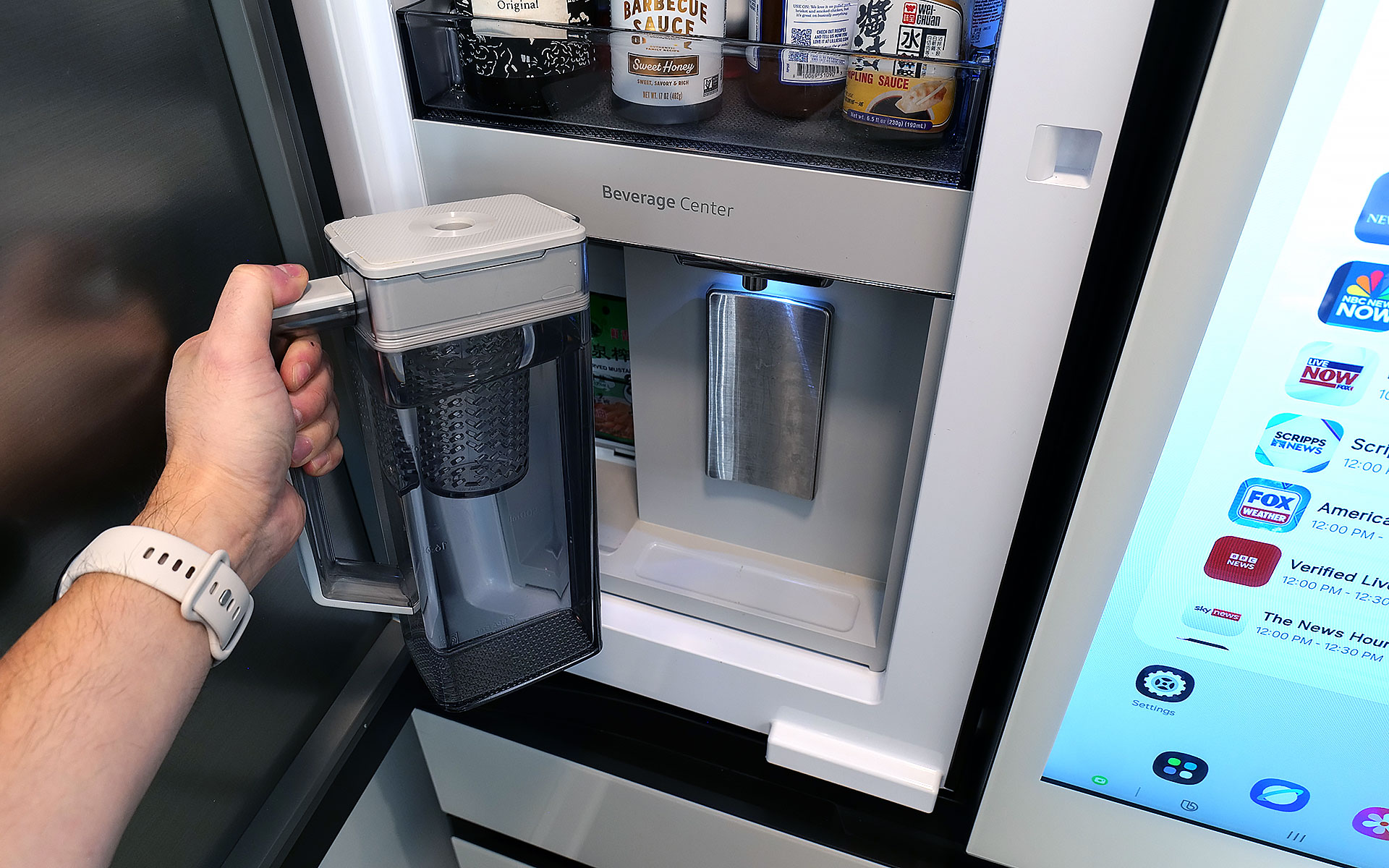
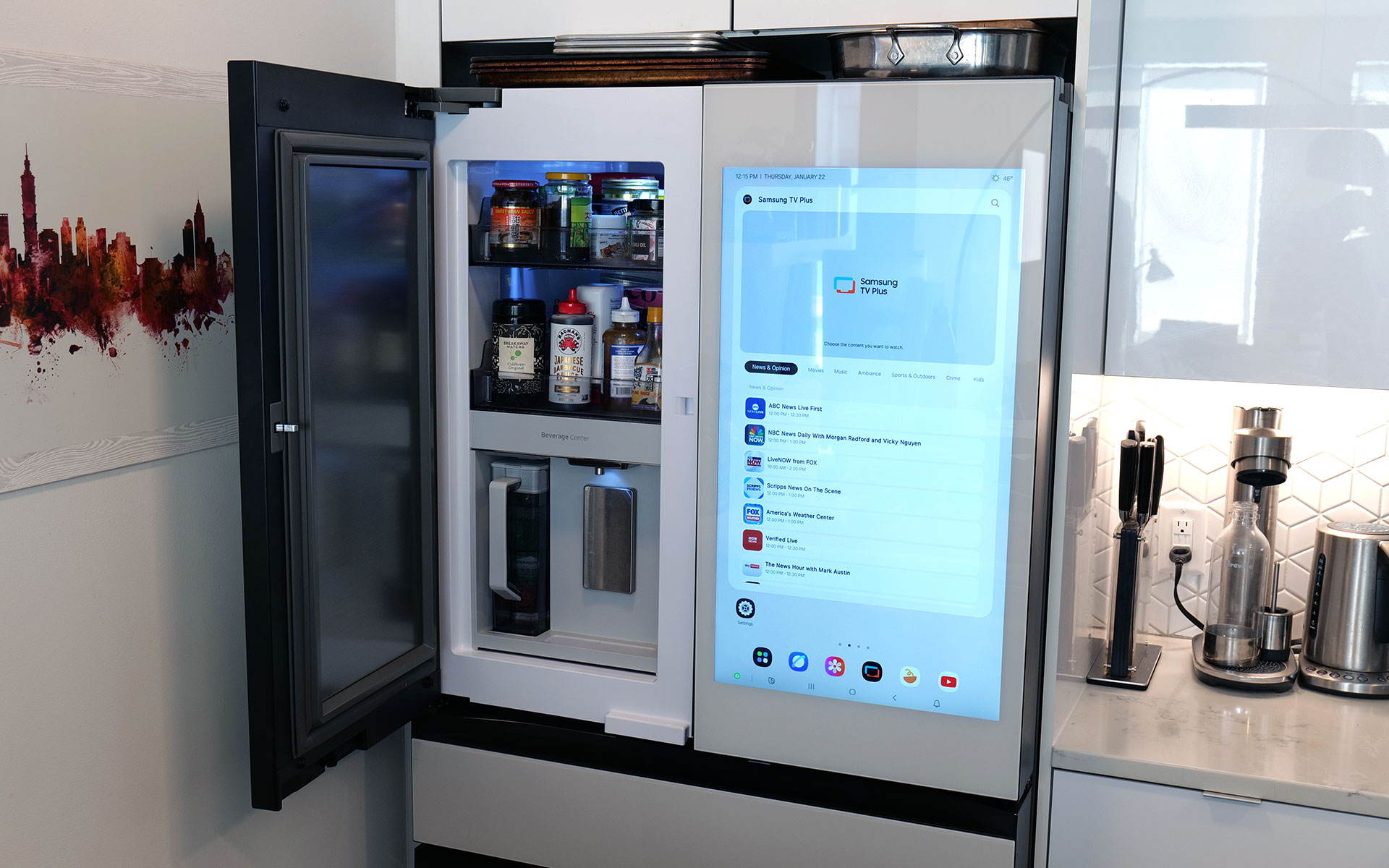
I've already gone on record about how Samsung's Beverage Center is the best new feature to land on any fridge in years, so without belaboring the point, but I'll happily wax poetic about it again. Instead of having a water dispenser installed smack dab on the outside of the door, Samsung opted to hide things behind an exterior flap on the left side of the fridge. This accomplishes several things. Not only does it feel a bit more hygienic because the spigot isn't subjected directly to all the germs swirling around the kitchen or a cough or sneeze from anyone passing by, it also simplifies the fridge's exterior design. This might sound a bit weird, but I've always thought that putting water dispensers on the outside of a fridge was kind of like installing a shower in the middle of a room. It's just kind of awkward. Furthermore, by opening the Beverage Center's door, you also have access to one of the fridge's interior shelves, which makes it quick and easy to grab things like ketchup, mustard or any other sauces you might need for a meal. My wife stashes her matcha there, so it's readily available first thing in the morning.
Samsung's Beverage Center is one of the best fridge innovations and years. It includes both a water dispenser and a built-in pitcher that refills itself automatically.
Sam Rutherford for Engadget
But the most important thing is that right next to the spigot, there's also a built-in water pitcher that automatically refills itself after every use. This means there's pretty much always 40+ ounces of ice-cold water (depending on the specific model) that you can pull out and pour. This allows you to fill up everyone's cup in seconds like a server at a restaurant, instead of blocking the entire fridge while you slowly top off each glass individually. To me, it's the difference between an active process where you can dictate your own pace versus having to stand there while the machine takes its sweet time. Plus, if you like infusing your water with fruit or tea, there's a built-in basket filter for that too. The Beverage Center is a truly useful innovation and one of Samsung’s biggest advantages over its rivals, and because the company patented it, it'll be years before competitors can come up with copies.
The top shelf in the freezer also contains the ice maker, which comes with an included scoop and the ability to make two difference kinds of cubes.
Sam Rutherford for Engadget
As for ice, the model I'm testing can produce two different types: regular cubes and smaller pebbles. There's also an included scooper and a dedicated shelf for storing it. Now I will admit that the smaller pebbles aren't quite as good as what you get from a standalone nugget-style icemaker, but in my experience they're more than good enough for anyone who likes variety in their frozen water. My small critique for Samsung is that I've heard the ice trays on other models come with sliders that have actual ball bearings instead of plastic rails and I wish the latter were a standard inclusion on every model. There's never so much friction that anything would get properly stuck, it would just be nice if things slid a bit more smoothly.
The screen: A welcome addition to a digital lifestyle
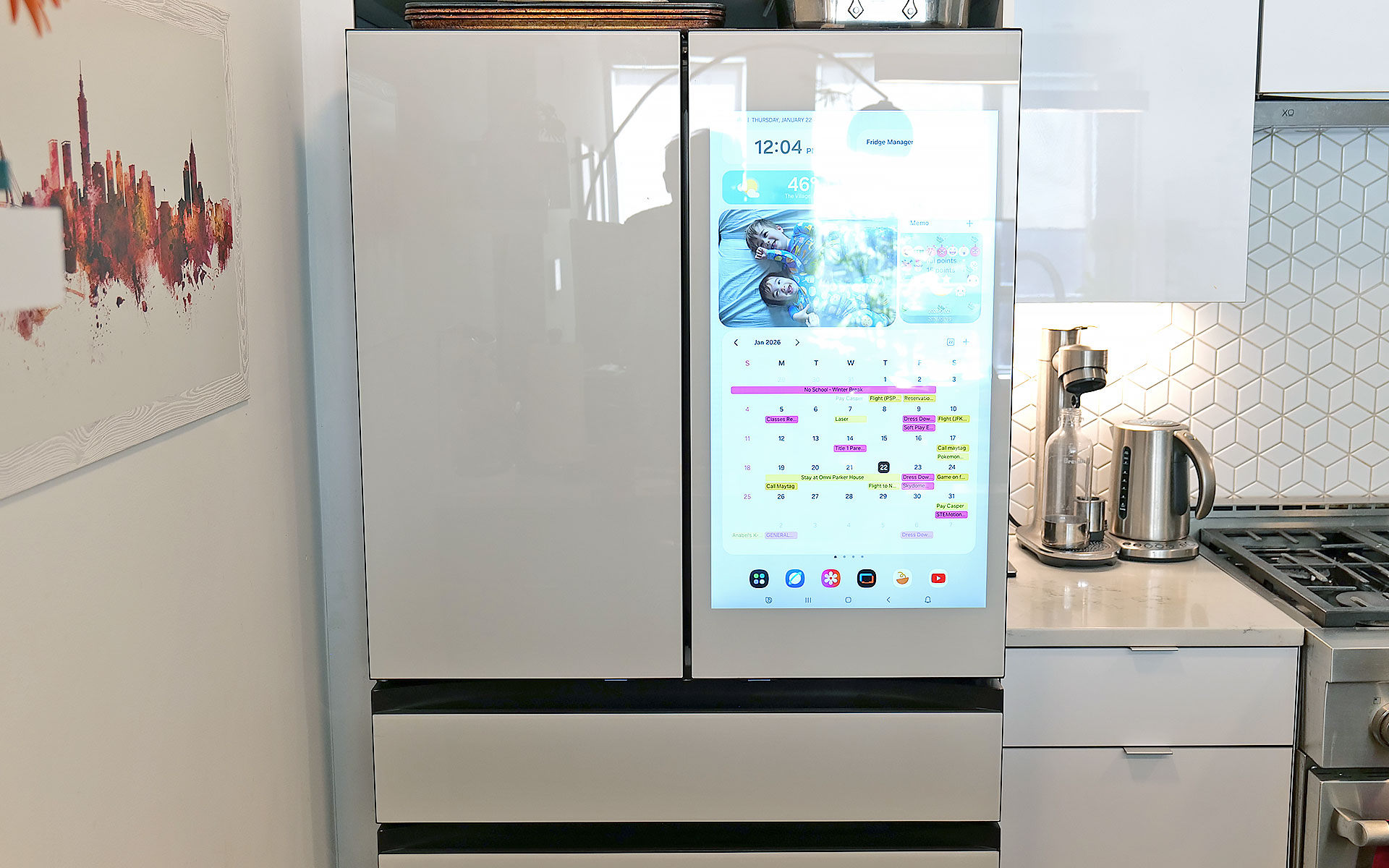
The fridge's 32-inch display can be used to write memos or draw, along with a ton of other functions.
Sam Rutherford for Engadget
Of course, one of the biggest potential objections about Samsung's latest fridges may also be one of its biggest strengths: their optional displays. With the continued intrusion of screens into our daily lives, I'm not here to tell you that you need one more. However, even though I was skeptical at first, I've grown to really appreciate having one on the fridge and I'd argue that unless you're skipping the feature entirely, the larger 32-inch panel is what you want.
The main reason is that, at least for my family, so much of what we do is already digital. Things like calendars, shopping lists, recipes and family photos already live on my phone and being able to share all of that with the fridge directly via Wi-Fi is a major plus. Frankly, it's easier to upload a picture to the fridge's display than it is to print one out and post it, which goes double for Samsung's Bespoke line since its glass front means magnets don't stick. Even though I already have a smart display in our kitchen, the size of Samsung's screen, along with support for a handful of important apps, have turned the fridge into a better family hub than anything else we own. Because there's so much space, there's room for photos, memos, the weather, filter status and a full 30-day calendar — the latter of which has significantly improved my family's planning and coordination.
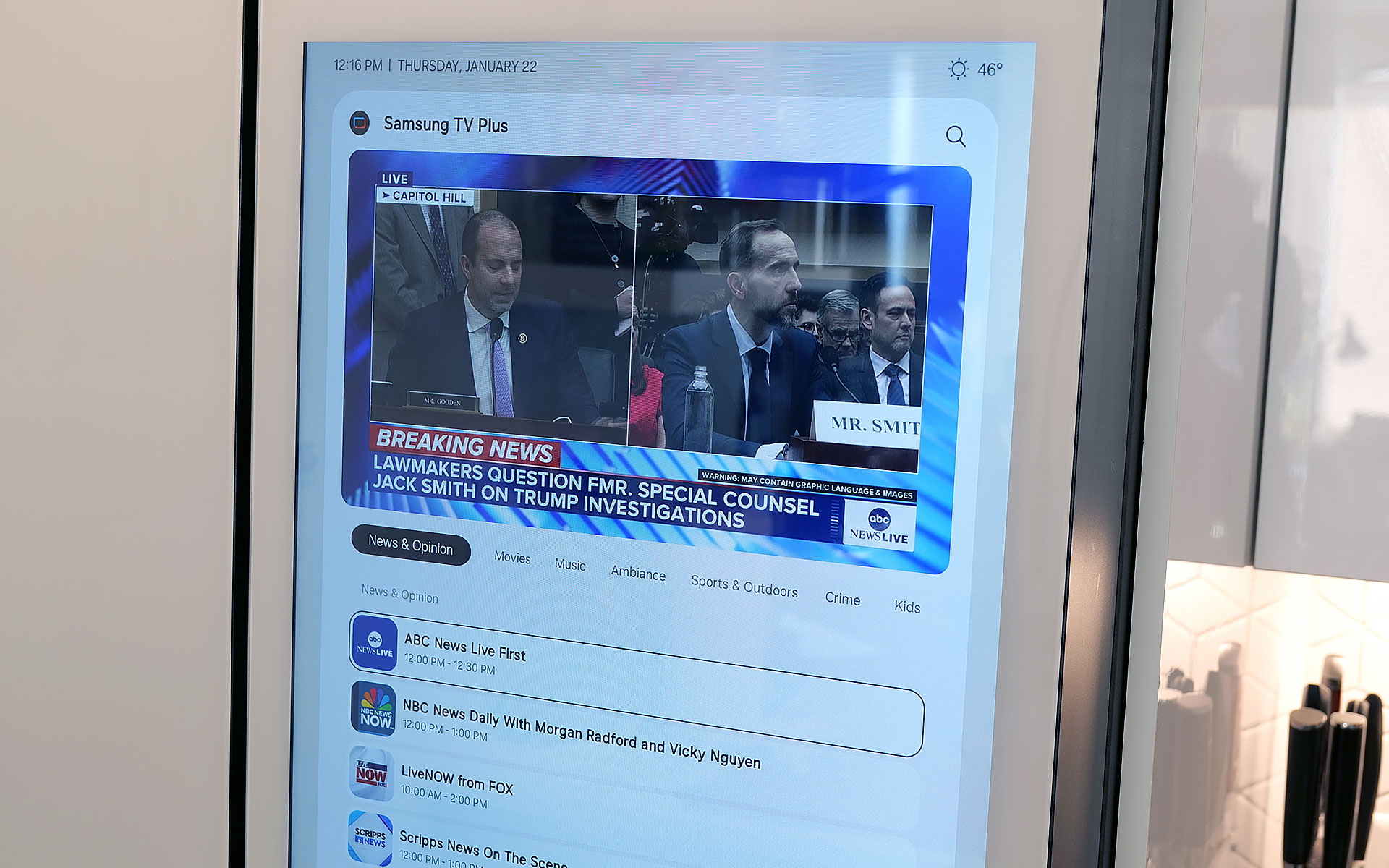
You can even watch TV or YouTube videos right on the fridge's display.
Sam Rutherford for Engadget
The fridge runs Samsung's Tizen OS, which is basically the company's lightweight take on Android, so it's super easy to use. You can swipe left and right to add additional widgets to your screen, play music or even watch videos (YouTube, Samsung TV Plus, etc.) if you're so inclined. That said, sometimes I wish the screen was a bit more responsive, because even though I don't think it's a dealbreaker, after having reviewed several generations of the company's phones, I know Samsung can do better. There are also some settings from its handsets that I wish would get ported over to its fridges — like a dedicated dark mode. When I grab a glass of water later at night, the last thing I need is the entire display blasting my kitchen like a pair of hi-beams.
AI Inside: A work in progress with benefits today
With seemingly every tech company trying to shoehorn AI into its latest products, it's easy to roll your eyes at the idea of adding that into a fridge as well. And I think even Samsung would admit that its efforts to integrate machine learning into the Bespoke line are a work in progress. I've found that while it certainly isn't essential, the AI features found here can be a handy bonus in the right situations.
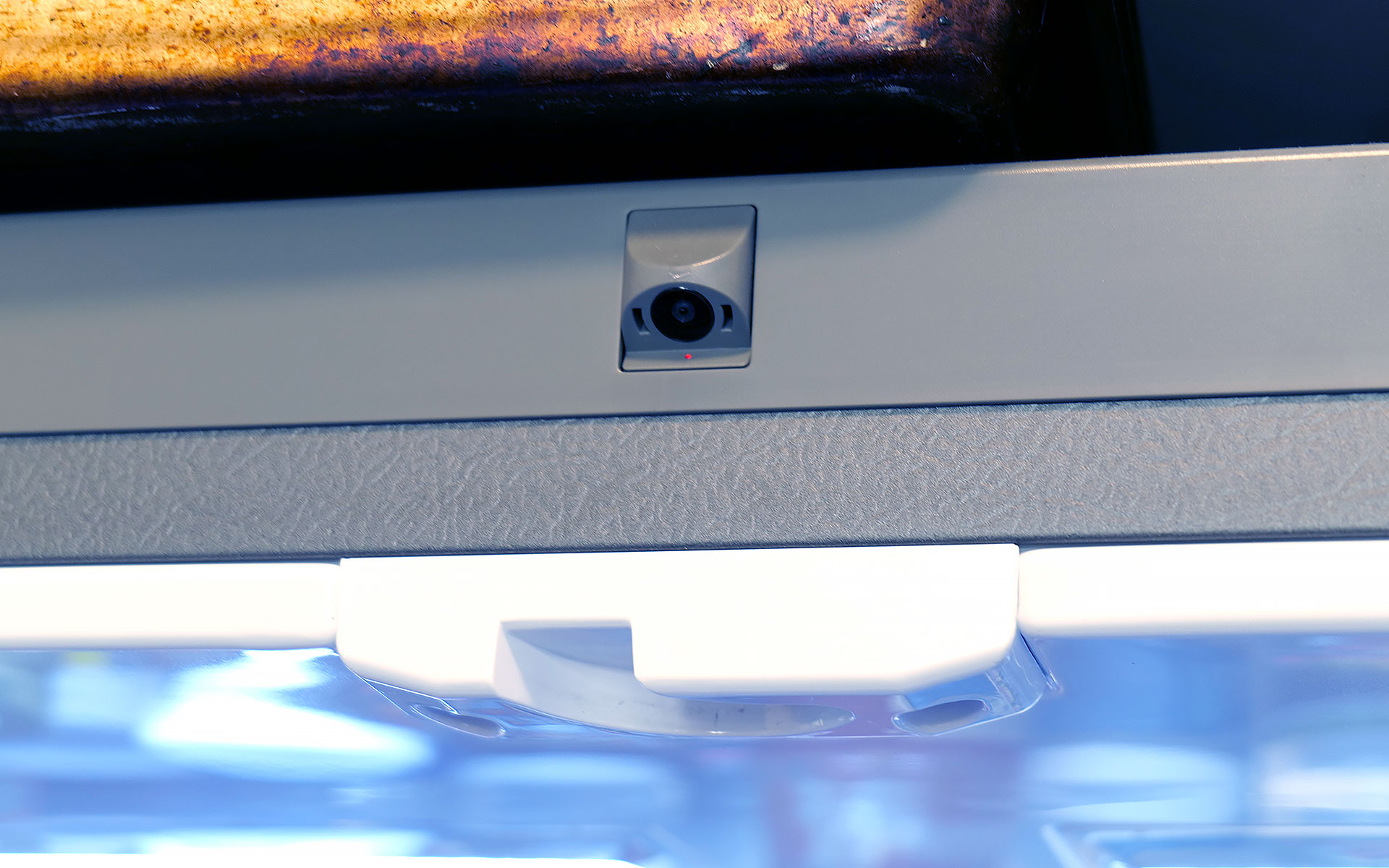
Bespoke models with AI feature a camera mounted to the top of the fridge that can recognize and take pictures of the food you put inside.
Sam Rutherford for Engadget
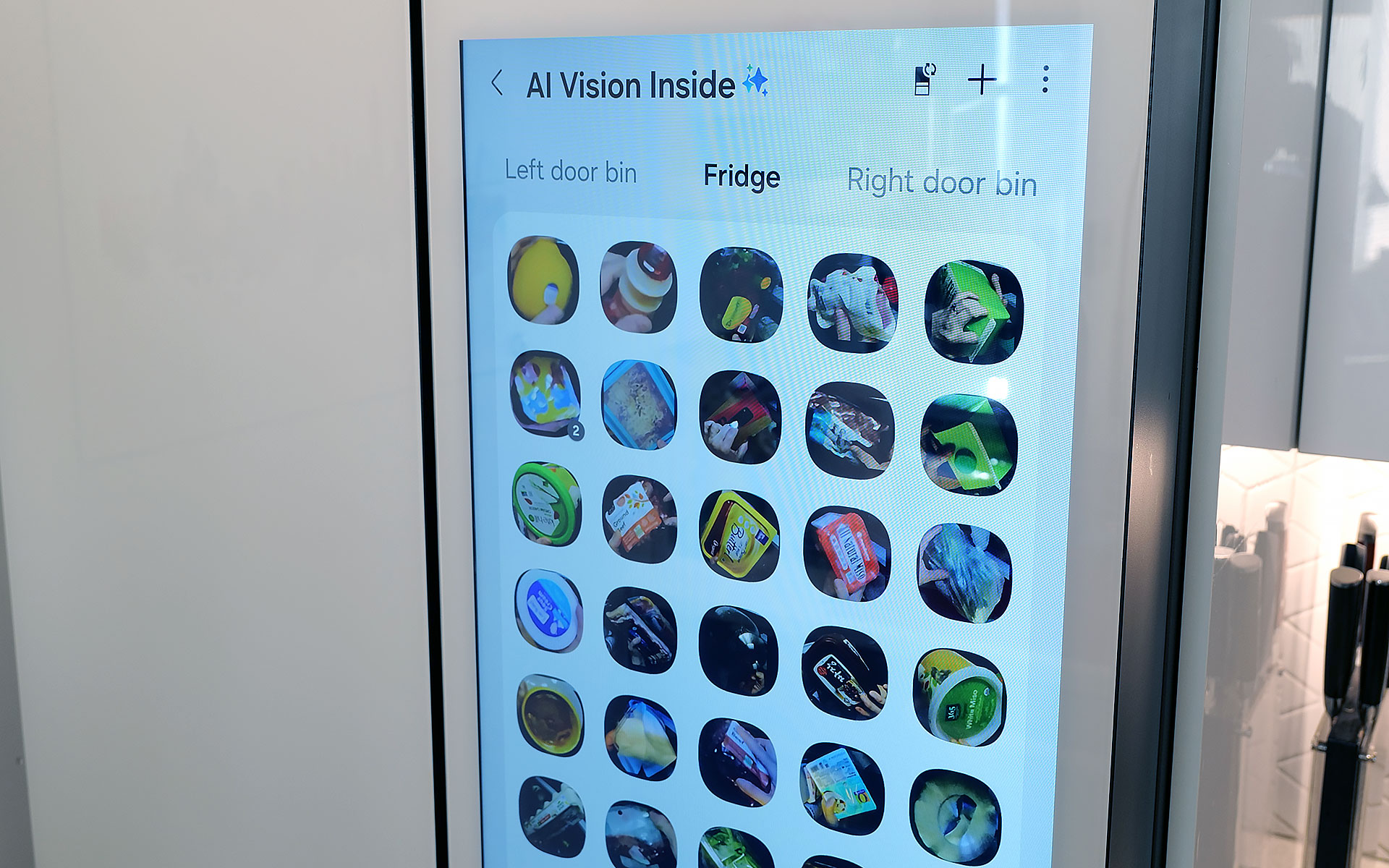
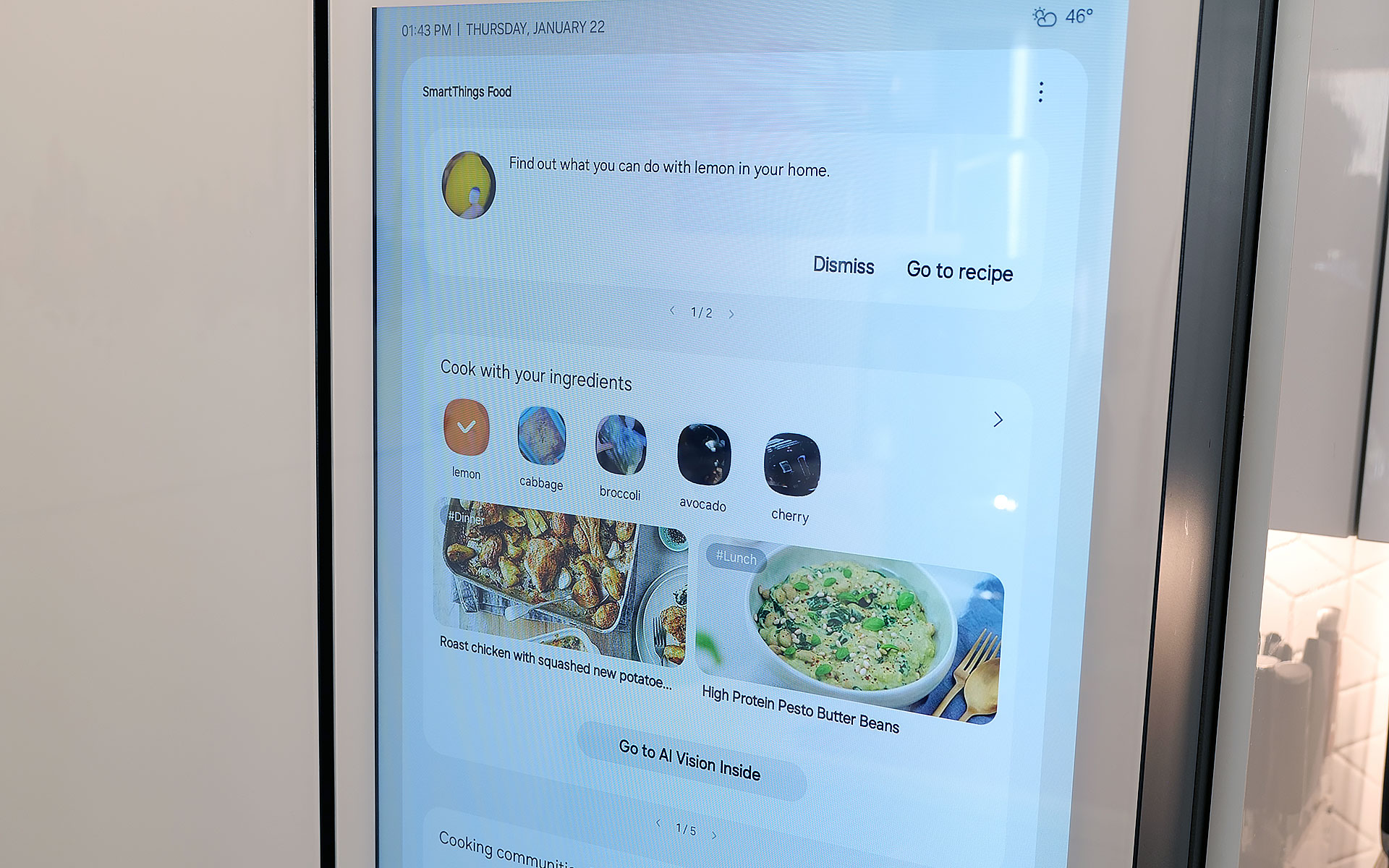
AI Vision is the headline feature in Samsung's package, which uses machine learning and a camera mounted to the roof of the fridge to automatically recognize and record items you put inside. However, there are some limitations. Currently, Samsung's AI can detect 37 different food items like fresh fruit and veggies, along with an additional 50 kinds of packaged goods like yogurt. Furthermore, the camera only records what goes into the fridge's main cabinet, so anything you put in the FlexZone drawer, freezer or either door won't get recorded. Regardless of whether an item is recognized or not, the fridge will then take a photo of the item (and tag it with the name of the food if it can be properly identified). You can then view a list of everything in the fridge via a dedicated tab on its screen (assuming your model has one) or from your phone via Samsung's SmartThings app. From there, you can do things like set names for anything uncategorized or add an expiration date, though I wish the fridge would do that last part on its own.
The fridge uses AI to automatically track food that it can recognize and applies labels to the corresponding photo.
Sam Rutherford for Engadget
In practice, this means you just put items in the fridge like you would normally and let the AI sort things out on its own. You can always go through the main list to see if you have a specific item or let the fridge automatically delete things when you take them out. That said, the AI doesn't get things right every time, because while Samsung's programming does clear things out after a certain amount of time, you will still need to delete food manually from time to time. Thankfully, for items in the door, the fridge can show you a live feed of what's there, so if you're at the store and can't remember if you have milk or not, you can simply pull out your phone and see for yourself.
Because the camera is mounted to the top of the fridge, you might not get the clearest picture or you may end up with your hand covering part of the food as the fridge takes a picture as you put items inside. Even so, that's still more than enough for me to be able to tell what something is just by looking at a small icon. I've found that Samsung AI Vision legitimately makes it easier to grocery shop by allowing me to see what food I have at a glance, regardless of whether I'm at home or at the store.
Samsung also uses AI to suggest recipes based on ingredients you already have in the fridge. You can even specific things like food preferences and dietary restrictions.
Sam Rutherford for Engadget
On top of that, the fridge also has built-in meal planning capabilities. This means you can ask the fridge to come up with a dish based on ingredients you already have, and it's surprisingly good. Not only do you have the ability to specify preferences and dietary restrictions, there's a wide variety of recipes it can choose from. On several occasions, I even found that when asked to suggest a recipe, the fridge came up with dishes I already had in mind. Alternatively, it will highlight when you're missing items for a potential dish, so you can grab them the next time you're at the store. This is one of the most helpful features, because often at the end of the week, I find myself with a handful of leftover ingredients. So when the fridge uses that info to suggest recipes that use those items, it helps reduce food waste.
Sadly, the weakest part of Samsung's AI is Bixby. In addition to being overeager when listening for voice prompts, which ended up causing a lot of inadvertent triggers, Samsung also put the Bixby icon near the bottom left corner of the screen. That's right next to the sensor and handle for the door, resulting in even more unwanted summons. After using this fridge for four months, I wish Bixby would just go away, and it seems Samsung agrees. Sometime later this year, the company is adding support for Google Gemini, which should deliver a massive upgrade to the fridge's voice-controlled capabilities.
A word on ads
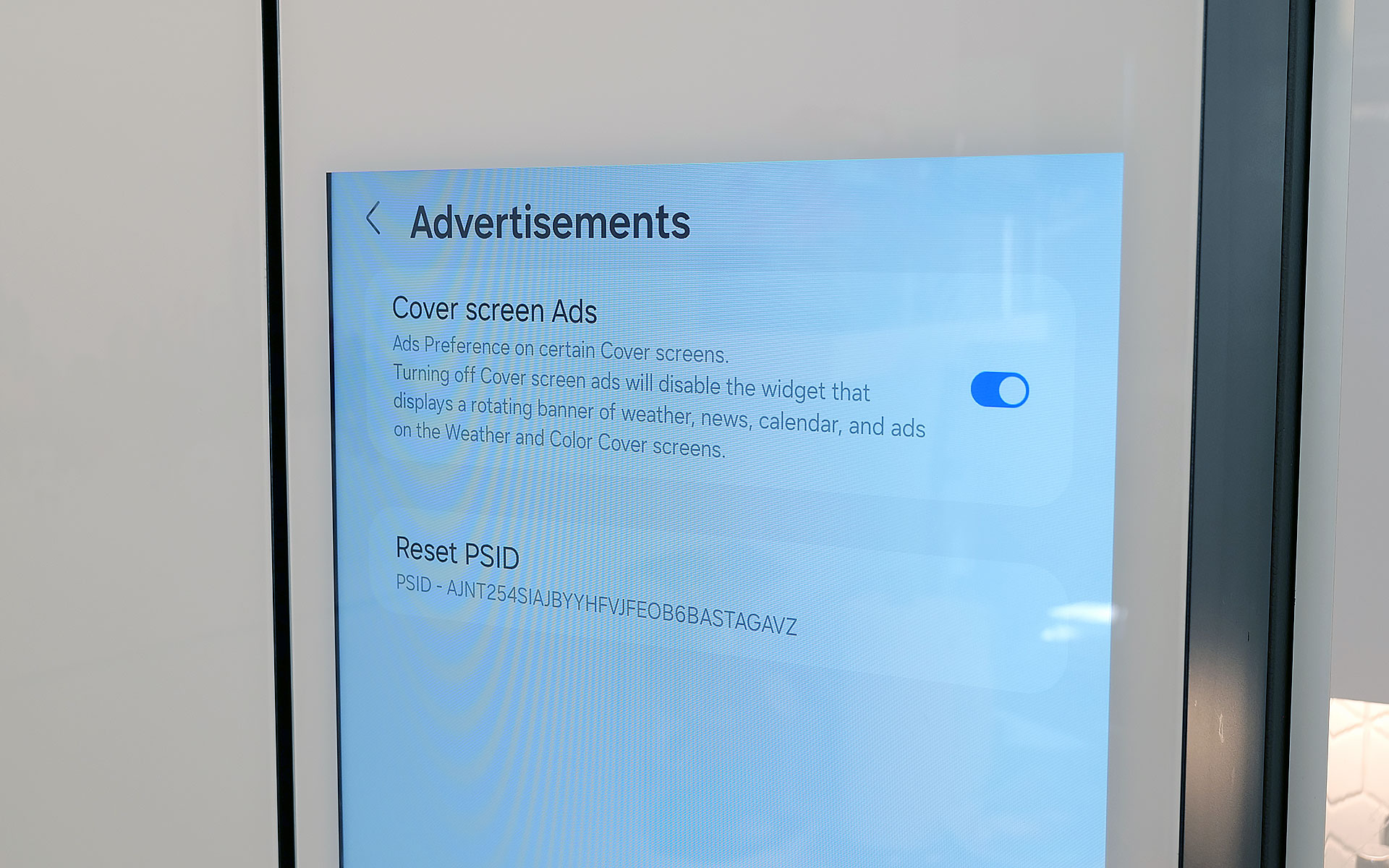
You can disable ads that show up on the fridge's cover screen, though that will also get rid of the news and weather widgets. Thankfully that doesn't impact that widgets on the fridge's main home screen.
Sam Rutherford for Engadget
Last fall, to the dismay of many, Samsung announced that it was adding ads to its Family Hub fridges, including Bespoke models with built-in displays. Now no one likes being taunted with commercials, especially when they're on expensive appliances located in the busiest room of their home. Thankfully, I've found that these ads only show up on the Cover Screen, which only appears after no one has used the fridge in a while, kind of like a screensaver on a desktop. Furthermore, you can disable these ads entirely. The downside is that doing so also gets rid of the rotating news and weather widgets that appear on the home screen. But in my experience, that's just fine, because I don't need what is effectively the fridge's lock screen to have that much going on. Plus, when you open the fridge or touch its screen, it instantly reverts to the main home menu, which includes its own set of widgets that you can customize how you like.
Some quick notes and observations
For some reason, the door to the Beverage Center doesn't soft close like the rest of the doors do.
Sam Rutherford for Engadget
The Bespoke fridge’s screen does collect smudges, but so does stainless steel, and it doesn't really impact viewability. And on white glass models like my review unit, the simple design makes it easier to clean and maintain than typical metal-clad rivals.
The door to the Beverage Center doesn't soft-close like you'd normally expect on a fridge. It's more of a clack, which isn't a bad thing on its own, though I hope Samsung changes its design to match the other doors on future models for consistency's sake.
Because the fridge runs Tizen and not full Android, there aren't nearly as many choices for widgets. For example, there's a widget for Spotify and Amazon Music, but not YouTube or Apple Music. There's also only a single option for weather and a widget for pinning your favorite websites, but very little choice when it comes to dedicated news options. In my testing, the SmartThings integration worked better on Samsung phones compared to standard Android handsets, but your experience may vary.
If you are so inclined, you can create shopping lists directly on the fridge and then order them from partners including Instacart, Amazon Fresh, Walmart and others.
Wrap-up
AI in a fridge might sound ridiculous, but it allows for some genuinely useful features, even if the tech suffers from growing pains. And while this might sound preposterous, I think Samsung should actually double down on the tech by adding even more cameras, so the fridge has more angles and viewpoints to choose from as its algorithms evolve. The ability to automatically track what goes in and out of the fridge makes it easier to both shop and plan meals, and this is just in the early stages of the tech.
That said, obsessing over AI is sort of besides the point because even without it, Samsung's Bespoke French Door fridge is a first-class icebox. For tech-savvy people, its big screen helps simplify and organize our digital lives while simultaneously allowing the fridge to be helpful in ways you might not have even considered. It's also well-built and exquisitely designed to fit in seamlessly with other modern devices, which feels refreshing considering how often appliances feel like they are lagging years or decades behind gadgets like phones and laptops. And I can't overstate how much I like Samsung's Beverage Center, which in my opinion, is so good it's worth going with a Bespoke fridge just for that one feature.
In the end, the two biggest factors you'll need to consider are price and your appetite to digitize your kitchen, and by extension, your life. Starting at $3,500 for AI-equipped Bespoke models, Samsung's top-of-the-line fridges are far from cheap. Thankfully, versions without machine learning can be had for much less. But more importantly, you have to be willing to embrace technology's role in your home. You may not agree or want to pay this much for features like this just yet, but Samsung's Bespoke AI 4-Door French Door refrigerator has convinced me there's a happy home for smarter iceboxes.
This article originally appeared on Engadget at https://www.engadget.com/home/kitchen-tech/samsung-bespoke-fridge-with-ai-review-all-the-bells-and-whistles-140000099.html?src=rss
A Reddit user reported that Gemini for Home initially refused to play white noise, claiming it could only broadcast messages.
The AI assistant eventually performed the task after the user encouraged it, highlighting a “gaslighting” trend in modern AI.
While Gemini in Google Home excels at context, it often struggles with basic commands that the original Google Assistant handled easily.
Gemini is slowly but surely replacing Google Assistant throughout Google’s smart home ecosystem. While we wait for a broader rollout, most Google Home users just want the basics to work again. Unfortunately, Google still has some work to do, as Gemini for Home sometimes ends up gaslighting users about what it can and cannot do, as one Reddit user found out.
Don’t want to miss the best from Android Authority?
AirPods Pro 3 have returned to an all-time-low price. You can pick them up for $200 right now, which is $50 off and the best discount we've seen since the earbuds came out at the end of last year.
We gave these AirPods a score of 90 out of 100 in our review and we consider them the best wireless earbuds for iPhone users. The third generation model is a substantial update to an already impressive product, bringing new features like live translation to the table.
The AirPods Pro 3 also offer heart-rate tracking, allowing them to stream live data to Apple Fitness and other third-party workout apps. This lets you track your fitness and close activity rings similarly to when using an Apple Watch.
Apple also improved the sound quality of this generation thanks in large part to a redesigned acoustic architecture that improves how air is delivered into the ear canal. Additionally, the company changed the angle of the drivers to help more sound get where it needs to go instead of bouncing off the sides of your ear. We felt the jump in audio quality from the last generation to this one was substantial.
The ANC on the AirPods Pro 3 has also been improved. Apple claims this model filters out twice as much noise as the AirPods Pro 2 and four times as much as the original AirPods Pro. We found the noise cancellation to be top-notch.
Live Translation is as neat as it sounds, leveraging the AirPods' noise cancellation tech, Apple's AI and beam-forming mics to help you understand a speaker in a different language. Right now, this is limited to a handful of languages with more being added over time.
It's not often you see one of Apple's best and most recent products on sale for 20 percent off, so if you're in the market for an upgrade or your first set of AirPods, consider taking advantage of this deal.
This article originally appeared on Engadget at https://www.engadget.com/deals/apples-airpods-pro-3-drop-back-down-to-a-record-low-price-140752588.html?src=rss
Google’s “Take a Message” feature on Pixel phones is not functioning as intended.
Instead of recording the caller’s message as a voicemail, it may allow them to hear you in the background.
The bug appears to affect all supported Pixel phones, starting with the Pixel 4.
If you have no time to go through all your voicemails, Google’s “Take a Message” feature for Pixel devices can be really useful. If you miss or decline a call, Take a Message can automatically spin into action, informing the caller that you’re unavailable and asking them to record a message. While it sounds like voicemail, the feature uses AI to transcribe the message and automatically store it in your Pixel’s call history, where you can revisit it later. While Take a Message was initially launched with the Pixel 10 series, Google promptly made it available on older devices as well. While very useful in theory, it has reportedly been malfunctioning, letting callers hear you instead of recording their message.
Several users have highlighted this issue with Take a Message on their Pixel phones over the last few months. These reports, spotted by 9to5Google, are not limited to any specific model and plague a range of devices, from the oldest supported Pixel 4 series to the newest Pixel 10. One of the oldest reports about the issue on the Pixel 5dates back several months. Here, the poster noted how their family could hear their wife even while the voicemail was supposedly being recorded. While they did not immediately suspect Take a Message, a few replies to the post suggest it is a possibility.
Rumors around Samsung’s upcoming midrange Galaxy A57 have been circulating for months, but the last few weeks gave us more clarity about what to expect, including a full-blown spec sheet that shows an impressive set of features like 45W charging and a large 4,900mAh battery in a slim 6.9mm body. All of this is excellent news for the Galaxy A57, but guess what? These upgrades trample all over the upcoming Galaxy S26 and S26 Plus.
This got me thinking: Has Samsung essentially given up on its Galaxy S series? Not the Ultra, of course, but the basic S and S Plus models? Is innovation dead for these phones?